Currency Settings: Difference between revisions
Jump to navigation
Jump to search
Created page with "SME supports a single default currency. Set your default currency through Windows settings as follows (instructions based on Windows 7 OS): 1) Select the Windows Start Icon and ..." |
No edit summary |
||
| (2 intermediate revisions by the same user not shown) | |||
| Line 2: | Line 2: | ||
Set your default currency through Windows settings as follows (instructions based on Windows 7 OS): | Set your default currency through Windows settings as follows (instructions based on Windows 7 OS): | ||
# Select the Windows Start Icon and go to Control Panel | |||
# Select Region and Language (Note that older Windows OS may have a similar but different name). | |||
# Select Additional Settings... button at the bottom right corner | |||
# Select Currency Tab | |||
# Select Currency Symbol you want to use and select Ok twice on dialog boxes to change your settings. [[File:CurrencySetting.JPG]] | |||
# Open or Restart SME [[File:EuroCurrency.JPG]] | |||
# Note: Some older SME reports may have fixed US$ symbol in the reports, if you need to use one of these reports you can change the report or contact support@h5sw.com to change the report to use the Windows currency symbol. | |||
Latest revision as of 21:54, 11 September 2012
SME supports a single default currency.
Set your default currency through Windows settings as follows (instructions based on Windows 7 OS):
- Select the Windows Start Icon and go to Control Panel
- Select Region and Language (Note that older Windows OS may have a similar but different name).
- Select Additional Settings... button at the bottom right corner
- Select Currency Tab
- Select Currency Symbol you want to use and select Ok twice on dialog boxes to change your settings.
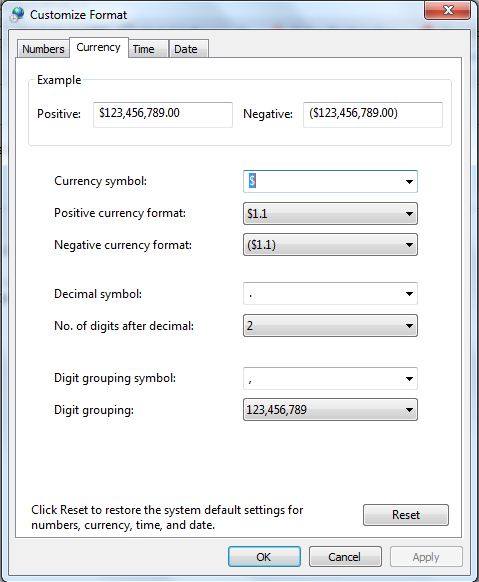
- Open or Restart SME

- Note: Some older SME reports may have fixed US$ symbol in the reports, if you need to use one of these reports you can change the report or contact support@h5sw.com to change the report to use the Windows currency symbol.

