Import Stock: Difference between revisions
Jump to navigation
Jump to search
Created page with "Once you have inventory list imported, you can import stock levels. Here are the steps: # First export your inventory list with the UID. You will need this UID to properly impo..." |
No edit summary |
||
| (5 intermediate revisions by the same user not shown) | |||
| Line 3: | Line 3: | ||
Here are the steps: | Here are the steps: | ||
# First export your inventory list with the UID. You will need this UID to properly import stock quantities | # First export your inventory list with the UID. You will need this UID to properly import stock quantities | ||
## Go to Utilities>Export | |||
## Select Inventory table | |||
## Select the following fields to export: | |||
### UID | |||
### Name (optional to identify the item) | |||
### Number (optional, should have either item name or number to identify the items) | |||
### Cost | |||
### Retail1 | |||
# Export your warehouse locations with UID | # Export your warehouse locations with UID | ||
# Create at least one stock value manually, see [[ | # Create at least one stock value manually, see [[Inventory Stock Levels]] | ||
# Export Stock as a template for importing | |||
## Go to Utilities>Export | |||
## Select MatDetail table | |||
## Select the following fields to export: | |||
### ItemUID | |||
### ItemName (optional) | |||
### ItemNumber (optional, should have either item name or number to identify the items) | |||
### Available (Quantity to add) | |||
### LocationUID | |||
### ItemCost | |||
### ItemRetail | |||
# Setup the Stock Import excel. | |||
## Use the Inventory Export file from step 1 to enter all the stock levels | |||
## Add column LocationUID and the value from step 4 | |||
## Add a column Available and set the quantity you want to import. NOTE: This is good for initial quantity or for ADDING stock, it should NOT be used for setting stock level as this will ADD the quantity set and imported. | |||
## Save this file for example StockImport.xls | |||
## [[File:InventoryStockImport.png]] | |||
# Import the Stock file | |||
## Always perform a backup before importing!! | |||
## Go to Utilities>Import | |||
## Select the file from the step above, in this example StockImport.xls. Make sure the file type is selected. If you exported an xlsx file, then set filetype to xlsx. | |||
## [[File:StockImport1.png]] | |||
## Map the fields and set "Attempt Match" for Item UID | |||
## [[File:StockImport2.png]] | |||
## | |||
ItemUID ItemName Quantity LocationUID VendorUID ItemCost ItemRetail | |||
IN10-13-051501412507 VMX Router Extreme 1 LC10-13-051357561250 VN10-19-051338231876 124.55 345 | |||
Latest revision as of 23:38, 11 February 2015
Once you have inventory list imported, you can import stock levels.
Here are the steps:
- First export your inventory list with the UID. You will need this UID to properly import stock quantities
- Go to Utilities>Export
- Select Inventory table
- Select the following fields to export:
- UID
- Name (optional to identify the item)
- Number (optional, should have either item name or number to identify the items)
- Cost
- Retail1
- Export your warehouse locations with UID
- Create at least one stock value manually, see Inventory Stock Levels
- Export Stock as a template for importing
- Go to Utilities>Export
- Select MatDetail table
- Select the following fields to export:
- ItemUID
- ItemName (optional)
- ItemNumber (optional, should have either item name or number to identify the items)
- Available (Quantity to add)
- LocationUID
- ItemCost
- ItemRetail
- Setup the Stock Import excel.
- Use the Inventory Export file from step 1 to enter all the stock levels
- Add column LocationUID and the value from step 4
- Add a column Available and set the quantity you want to import. NOTE: This is good for initial quantity or for ADDING stock, it should NOT be used for setting stock level as this will ADD the quantity set and imported.
- Save this file for example StockImport.xls

- Import the Stock file
- Always perform a backup before importing!!
- Go to Utilities>Import
- Select the file from the step above, in this example StockImport.xls. Make sure the file type is selected. If you exported an xlsx file, then set filetype to xlsx.
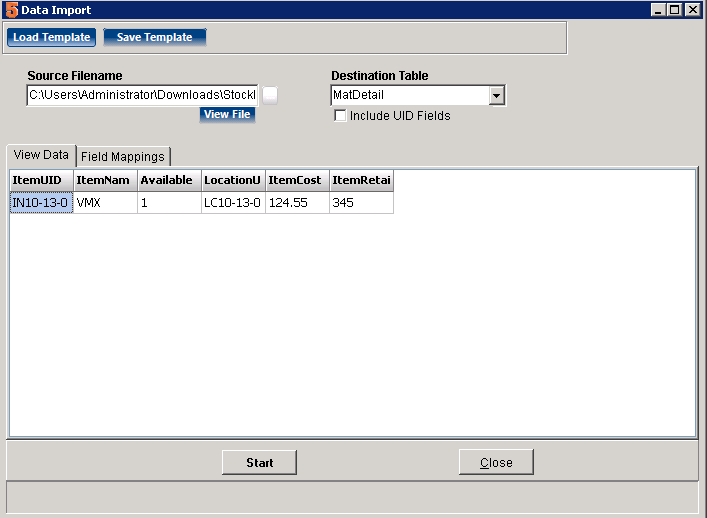
- Map the fields and set "Attempt Match" for Item UID
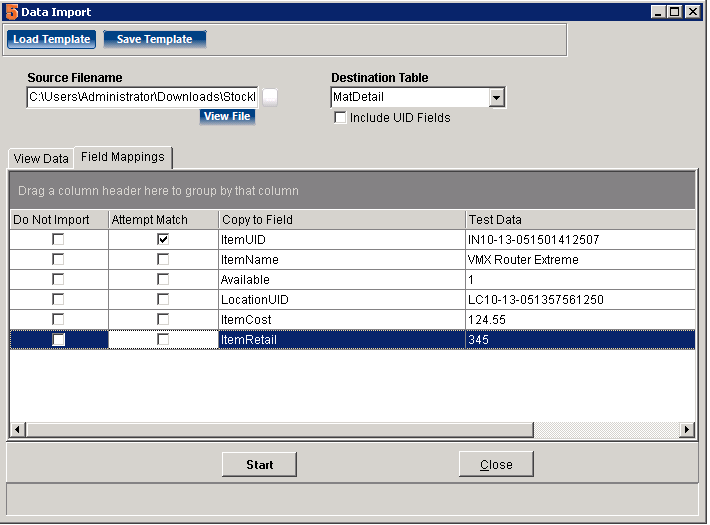


ItemUID ItemName Quantity LocationUID VendorUID ItemCost ItemRetail IN10-13-051501412507 VMX Router Extreme 1 LC10-13-051357561250 VN10-19-051338231876 124.55 345