Mass Order Editor: Difference between revisions
Jump to navigation
Jump to search
No edit summary |
No edit summary |
||
| Line 1: | Line 1: | ||
Mass Order Editor is a rapid batch processing application allowing a huge increase in productivity of your operations. | Mass Order Editor is a rapid batch processing application allowing a huge increase in productivity of your operations. | ||
Features of Mass Order Editor: | [[File:MassOrderEditor1.png]] | ||
<h3>Features of Mass Order Editor:</h3> | |||
* Filter order based on numerous conditions to focus in on specific orders to change. | * Filter order based on numerous conditions to focus in on specific orders to change. | ||
* View many orders at once in a summary format | * View many orders at once in a summary format | ||
| Line 7: | Line 9: | ||
* Search orders through a filtering smart search | * Search orders through a filtering smart search | ||
* Make changes to orders all at once based on the changes needed. Change any of the following | * Make changes to orders all at once based on the changes needed. Change any of the following | ||
** Close orders | |||
** Void orders | |||
** Change Order status | ** Change Order status | ||
** Classes (for QuickBooks class tracking) | ** Classes (for QuickBooks class tracking) | ||
| Line 17: | Line 21: | ||
** Secondary Tech | ** Secondary Tech | ||
** Due Date | ** Due Date | ||
** [[File:MassOrderEditor2.png]] | |||
<h3>Operation of Mass Order Editor</h3> | |||
The following is a typical process for the mass order editor: | |||
# Login to [[High5Hub]] or the mass order editor link | |||
## In the Hub select Applications>Utilities>Mass Order Editor. If you do not have this function for your login please contact High 5 Software representative to enable it. | |||
# | |||
Revision as of 15:21, 25 February 2015
Mass Order Editor is a rapid batch processing application allowing a huge increase in productivity of your operations.

Features of Mass Order Editor:
- Filter order based on numerous conditions to focus in on specific orders to change.
- View many orders at once in a summary format
- Multiple select many orders for changing
- Search orders through a filtering smart search
- Make changes to orders all at once based on the changes needed. Change any of the following
- Close orders
- Void orders
- Change Order status
- Classes (for QuickBooks class tracking)
- SLA categories
- Service Codes
- Zones
- Assigned To for assigning techs to orders
- Lead Tech
- Primary Tech
- Secondary Tech
- Due Date
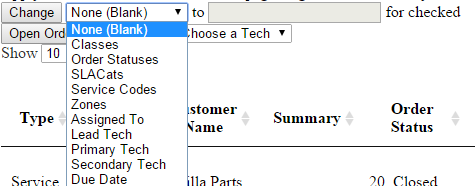

Operation of Mass Order Editor
The following is a typical process for the mass order editor:
- Login to High5Hub or the mass order editor link
- In the Hub select Applications>Utilities>Mass Order Editor. If you do not have this function for your login please contact High 5 Software representative to enable it.